If you ever wished your web browser could actually think and do tasks for you — meet Comet, the revolutionary AI browser from Perplexity. It’s not just another Chrome alternative; it’s a complete productivity engine that automates your research, emails, tab management, and even meeting prep.
Let’s dive into how Comet works, why it’s different, and how you can use it to become a digital powerhouse.
What is Comet?
Comet is an innovative AI web browser created by Perplexity, built from the ground up to transform the way you interact with the internet. Unlike conventional browsers that expect users to manually search, click, and manage dozens of tabs, Comet empowers you with an intelligent AI agent that lives right inside your browser. This assistant can search, summarize, automate repetitive tasks, write emails, organize your research, and even perform complex workflows—all directly from any tab you’re viewing.
Launched in 2025 and built on the robust Chromium backbone, Comet offers a familiar interface for users accustomed to Google Chrome and Chromium-based browsers, while adding the next generation of AI-driven features that fundamentally reshape productivity and web navigation. With agentic AI capabilities, Comet doesn’t just answer your queries: it takes action on your behalf, letting you focus less on digital busywork and more on your goals.
As of October 2025, Comet is available free for all users globally. Signing up grants early adopters access to the latest features and improvements, positioning Comet as not just a tool, but a game-changer in browser technology—designed for professionals, researchers, students, and anyone seeking to make the web work for them.
💡 In short, Comet doesn’t just browse the web — it works on it for you.
Why Use Comet?
In a world flooded with information, the right tools can make all the difference—turning chaos into clarity and ordinary browsing into meaningful action. Comet isn’t just another browser; it reimagines your entire digital workflow by embedding a smart, agentic AI directly into your browsing experience.
1. Smart Assistance Everywhere:
With Comet, every tab you open becomes a potential workspace powered by AI. Whether you’re researching financial reports, managing your emails, or shopping online, Comet’s assistant is ready to help. Imagine highlighting a news report about Tata Technologies, then instantly asking Comet to summarize key points, analyze market sentiment, or draft an email with your findings—all without switching apps.
2. Agentic Workflow Automation:
Most AI browser plug-ins simply retrieve information, but Comet’s agentic capabilities mean it can act for you—automating multi-step processes that once required tedious clicks and manual input. Need to register for a webinar, extract relevant data, and schedule reminders? Comet can handle this in one seamless workflow, reducing time and error. Tasks like tab grouping, email drafting, form-filling, and even booking meetings become automated routines.
3. Contextual, Conversational Search:
Forget about wading through search results. Comet transforms search into a dialogue—delivering concise, AI-generated responses with proper citations, empowering you to ask follow-up questions and reference specific open tabs or project workspaces. The search is contextual, so you get answers tailored to your current activity, be it investing, reporting, or learning.
4. Effortless Transition for Chrome Users:
If you’re used to Google Chrome, transitioning to Comet is painless. You can import your bookmarks, browser extensions, history, and even some settings with a click. The familiar layout means no learning curve, but a massive productivity upgrade.
5. Focused on Productivity and Privacy:
Comet isn’t just about speed; it’s about empowering users to do more in less time, with less frustration. AI-powered tab management reduces distractions and keeps your research organized. Privacy remains a priority, with transparent controls over what data your AI assistant can access.
Ultimately, Comet lets you delegate the routine digital chores so you can devote your attention to content creation, deep analysis, or simply enjoying a more stress-free browsing session. Whether you’re a researcher, content writer, stock market enthusiast, or a student, Comet is built to help you work smarter, not harder.
Example: Instead of searching “best noise-cancelling headphones” and opening 10 tabs, just ask Comet:
“Compare the best noise-cancelling headphones under ₹20,000 with pros and cons.”
It’ll deliver a concise, cited summary in seconds.

Getting Started: Install and Set Up Comet
Jumping into the future of web browsing with Comet takes just a few simple steps. Whether you’re a first-time user or switching from Chrome, the process is designed for seamless onboarding and instant productivity gains.
1. Sign Up and Download
Begin by visiting the Perplexity website or following a referral/invite link. Registration is quick, and once completed, you’ll receive instructions to download and install the Comet browser on your device. Early users benefit from full access to the latest AI features free of charge, making it an ideal time to get started.
2. Install and Configure
Launch the installer and follow the intuitive setup wizard. Comet’s interface borrows familiar cues from Chromium and Chrome, so the navigation feels instantly comfortable—no lengthy learning curve or re-training required.

3. Import Your Chrome Data
Making the switch couldn’t be simpler: Comet offers one-click import for your Chrome bookmarks, extensions, browsing history, and most settings. This is especially convenient for users who have curated extensive setups over the years, allowing all your favorite productivity tools and resources to remain accessible.
4. Set Comet as Your Default Browser
For maximum benefit, set Comet as your system’s default browser. This ensures all external links and web-based workflows automatically launch in Comet, putting its intelligent assistant and agentic features at your fingertips all day.
5. Take the Guided Tour (Optional)
First-time users are greeted with an onboarding tour that highlights AI-powered search, assistant activation, agentic tab management, and voice command features. It’s highly recommended to explore this walkthrough, as it showcases time-saving tips and advanced shortcuts you might otherwise miss.
With Comet installed and configured, you’re ready to experience the difference: the web becomes not only browsable but truly actionable, with powerful AI tools just a click—or a spoken command—away. This sets the foundation for transforming routine internet use into a streamlined, personalized productivity engine.
Comet Assistant: Your AI on Every Tab
One of Comet’s most transformative features is its built-in AI assistant—a smart, conversational agent that’s available instantly on every webpage you visit. This assistant isn’t isolated to a search box or a single plugin; instead, it’s contextually aware of the page you’re on and the tasks you want to accomplish. Here’s how the Comet Assistant takes your browsing to a whole new level of interactivity.
Contextual Understanding for Any Task
With a single click on the Comet Assistant icon (usually docked at the lower right of your browser) or using a convenient keyboard shortcut, the assistant opens up as a sidebar overlay—ready to help. Whether you’re reading an investment report, drafting a blog post, or filling in complex forms, the assistant recognizes your context and adapts its support accordingly.
Multi-Modal Input: Type or Talk
Comet’s assistant understands both typed and spoken prompts. You can type a direct question like:
-
“Summarize the key findings from this page in five bullet points.”
-
“What are the latest news headlines about Indian markets?”
-
“Extract calendar dates and create reminders for upcoming earnings calls.”
Or, you can use voice commands—perfect for multitasking or when inspiration strikes during hands-free work.
Real-Time Actions, Not Just Answers
Unlike traditional browser add-ons, the Comet Assistant can interact with the content of the webpage you’re viewing. If you’re reading a research article, you can instantly request a summary, extract all the tables or key statistics, or even ask the assistant to draft an email based on your findings. Planning travel? Ask Comet to compare hotel offerings, organize your research into a project folder, and notify you of the best deals—all within the active tab.
Seamless Workflow Switching
You’re never restricted to a single function. Within the assistant panel, you can switch from summarizing a page to searching the web, refining your queries, or launching deeper workflows without ever leaving your spot. For example:
-
Review a blog draft in one tab, research competitor articles in another, and have Comet merge findings for a content gap analysis.
-
Keep a dialogue running as you browse, so previous insights and actions remain accessible.
Hands-On Productivity—All from Sidebar
Comet’s assistant is engineered for productivity: its sidebar gives you quick tools for copying summaries, exporting insights, emailing results, or triggering follow-up actions within seconds. It converts every browsing session into a conversation—where you, the user, are always in control, supported by the power of AI.
Real-World Examples: What Can Comet Do?
Comet isn’t just about browsing—it’s about turning the web into an actionable, intelligent assistant. To truly grasp its potential, let’s explore some everyday scenarios where Comet becomes an indispensable productivity powerhouse.
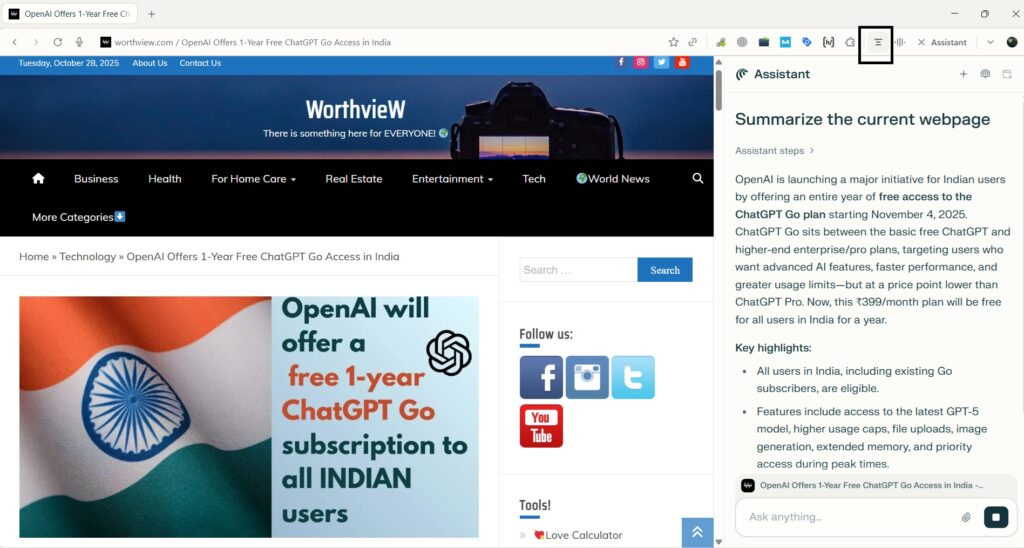
1. Summarize Long Articles and Reports Instantly
Reading through dense financial reports, research papers, or news articles can be time-consuming. With Comet, you simply call up the assistant, prompt “Summarize this page in five main points,” and receive a neatly organized, accurate summary within seconds. This is invaluable for investors, researchers, and students who need to keep up with a flood of information but don’t have time for every detail.
2. Extract and Organize Data Effortlessly
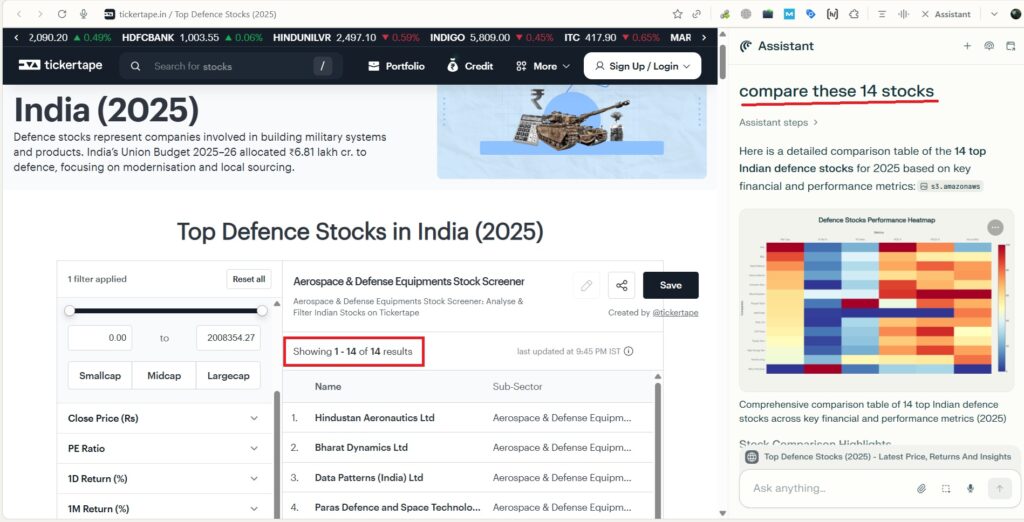
Let’s say you’re comparing multiple stocks or ETFs and want the key data tables or historical price points collected in one place. Comet’s assistant can extract tables and major figures from disparate sites, compiling them into an exportable spreadsheet or a project workspace. This means no more manual copying or switching between tabs—just ask and it’s done.
3. Automate Multi-Step Digital Tasks
Suppose you want to sign up for a webinar, add the event to your calendar, find related resources, and group everything for easy reference. Comet automates these multi-step processes—filling out registration forms, parsing confirmation emails, creating reminders, and even summarizing session topics for you. In a single workflow, actions that used to take 10–15 minutes (and several tabs) are now handled by your AI co-pilot.
4. Advanced Email and Communication Management
Struggling with inbox overload? Ask Comet to find all unread emails about a specific project, summarize their contents, draft responses, and schedule follow-up meetings. For professionals who juggle multiple client communications or team updates, this is a legitimate time-saver.
5. Tab Chaos Solved with One Prompt
If you regularly accumulate dozens of tabs—news, research, emails, analytics dashboards—Comet lets you instantly declutter. Activate the /tab-cleanup command and watch as the assistant groups, closes, or organizes tabs into relevant workspaces. This turns potential distraction into categorized, actionable projects.
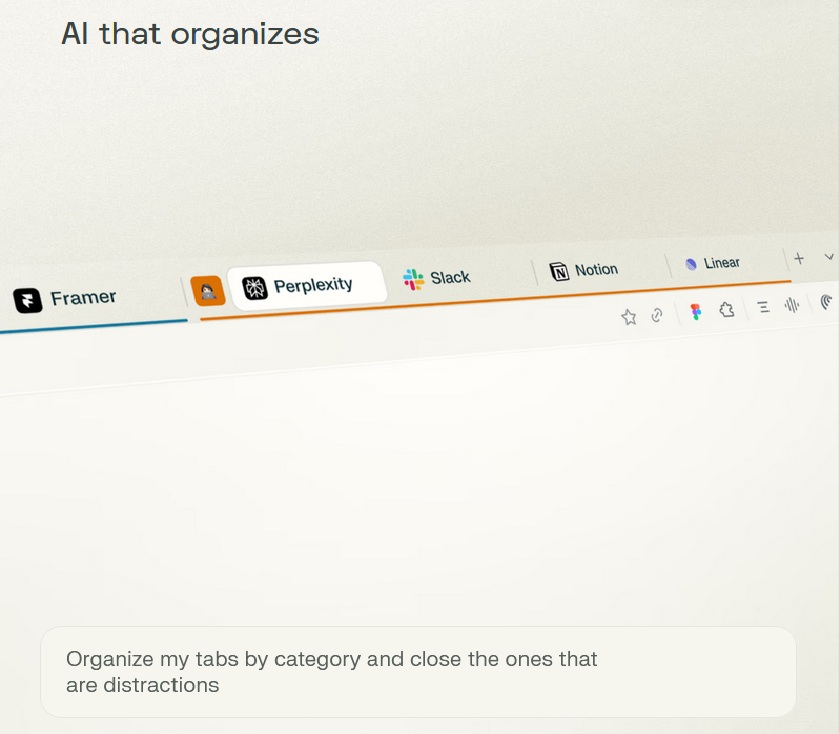
“Group these 15 tabs by topic and close any that aren’t relevant to my current project”
6. Power Content Creation and Research
Writing a blog post or compiling research? Keep the assistant open to cross-reference sources, ask for content outlines, suggest meta descriptions, or get real-time statistics updates. You remain in your creative flow, while Comet handles the retrieval and preliminary synthesis of supporting data.
Each of these use cases demonstrates how Comet goes beyond simple search. It acts—making research, communication, organization, and even content creation not only more efficient, but significantly less stressful.
Final Thoughts: Why Comet Changes the Web Experience
Comet isn’t just a browser—it’s a productivity platform driven by the intelligence of AI and built for the way modern users work, learn, and communicate online. By integrating agentic AI and contextual understanding directly into every tab, Comet frees you from the tedious digital chores that drain time and energy.
Whether you’re an investor analyzing market trends, a researcher navigating dense articles, a professional coordinating projects across emails and calendars, or a content creator crafting valuable insights—Comet adapts to your workflow, actively supports your goals, and keeps your work organized and actionable.
Gone are the days of juggling countless tabs, manually hunting for answers, and struggling to manage everyday browser chaos. With Comet, your web experience becomes interactive, personalized, and efficient—an assistant by your side powering every click, search, and command.
Related Posts
 Bharti Airtel and Perplexity: A Game-Changing AI Collaboration in India
 Claude Skills for SEO: How to Build Smarter Workflows and Get Better Output
 Trump vs Anthropic: The Real Reason Behind the US Government AI Ban
 Google Pomelli AI Tool Launched in India: What It Is, Features, and How It Helps Small Businesses