Most guides to TradingView alternatives in 2026 compare charting features and skip the line item that actually decides cost: real-time market data. Here is the full picture — pricing, the retail-vs-professional fee cliff, a platform comparison table, and which option fits crypto, stock, and forex traders.
For most of the past decade, the headline story in retail trading was subtraction. Brokers raced the commission to zero, app-based platforms made $0 trades the default after late 2019, and a wave of new investors arrived expecting markets to be, in effect, free to access.
The commission did disappear. The cost did not. It moved — into software subscriptions, indicator marketplaces, and, above all, exchange market data. For traders and investors weighing TradingView alternatives in 2026, real-time market data cost is frequently the largest recurring number on the invoice, and the structure that produces it is poorly understood even by the people who pay it every month.
TradingView Alternatives in 2026: Start With the Market-Data Bill
The reason most comparisons of the best trading platforms mislead is that they rank charting tools, indicators, and interfaces while treating data as free. It is not. Real-time stock data cost is where two traders on identical screens end up with very different monthly bills.
So this comparison inverts the usual order. Before features, follow the data — because the data bill is the part of a TradingView alternative that the marketing pages bury.
Is TradingView Free Real-Time? What the Default Feed Actually Covers
Yes — partly. TradingView, used by more than 100 million people, streams real-time US stock quotes on every tier, including the free version. That data is sourced from Cboe’s BZX exchange, which TradingView describes as carrying more than a quarter of US stock volume.
For a swing trader running technical analysis on liquid large caps, that feed is adequate, and the platform says so: the difference versus the primary exchanges is, in most cases, not noticeable. The catch is structural. A single venue reports only the trades that cross it, and US equity volume is splintered.
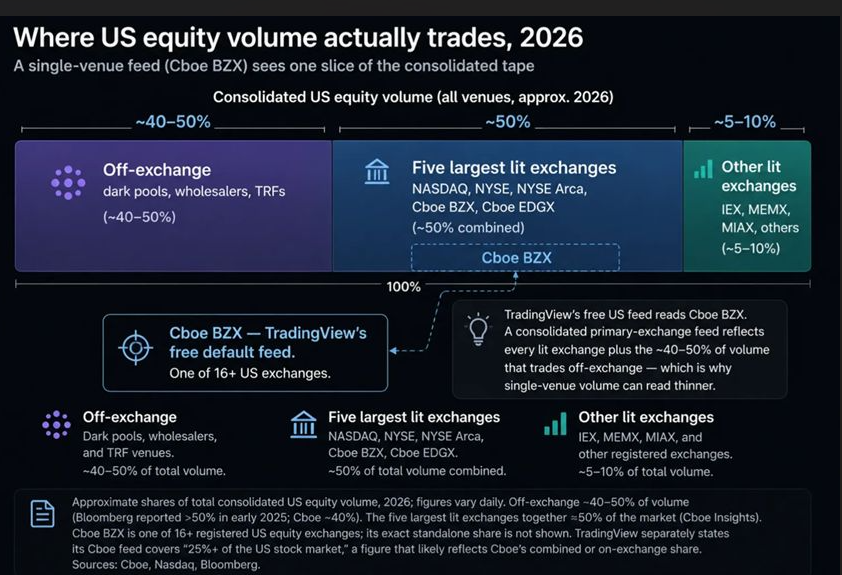
Roughly 40% to 50% of that volume now executes off-exchange — in dark pools and wholesaler flow — a share Bloomberg reported crossing 50% for the first time in early 2025. The rest spreads across 16-plus registered exchanges. One venue, however large, sees a slice. Every charting platform you evaluate inherits that same Cboe default for its free real-time US data.
[ILLUSTRATION 1 — “Where US equity volume actually trades”: stacked bar showing ~40–50% off-exchange, ~50% five largest lit exchanges (incl. Cboe BZX), ~5–10% other lit exchanges. Caption: US equity volume is fragmented across 16+ exchanges plus a ~40–50% off-exchange segment; a Cboe BZX–only feed reads one slice of the consolidated tape.]
That fragmentation is why a high-volume intraday trader — reading order flow and volume-weighted average price across short timeframes — eventually wants data direct from the primary listing exchanges: NASDAQ, the NYSE, and NYSE Arca.
Real-Time Stock Data Cost: Retail vs Professional Fees
Direct primary-exchange data is an add-on, sold per venue on top of the subscription. For non-professional retail users the figures are modest: individual feeds run roughly $2 to $10 a month, and TradingView’s five-feed US bundle lists at $9.95. Bought separately, those same US stock feeds total around $17, so the bundle is the rational purchase for multi-venue traders.
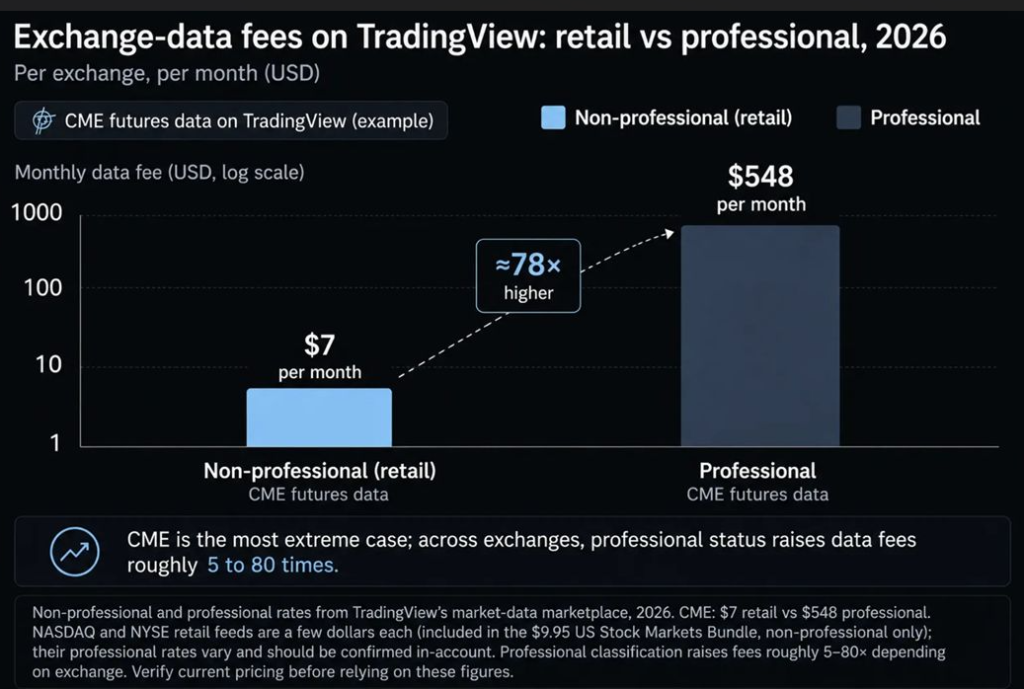
The number that surprises people sits one classification away. Professional status — which sweeps in many traders who use data for any business purpose — multiplies these fees. CME futures data is the cleanest published example: about $7 a month for a non-professional, and roughly $548 a month for a professional. Same data, repriced by nearly 80 times.
That cliff is exchange-mandated, not platform-specific — every vendor passes it through. But it explains why “real-time data” is impossible to quote without first asking who is classified as what, and why real-time stock data cost is the hidden variable in any charting platforms comparison.
TradingView Pricing Alternatives: When Flat Beats À La Carte
Net it out for a non-professional who wants primary-exchange data. On TradingView, that is an entry subscription plus the $9.95 bundle — call it $25 a month, or roughly $275 to $300 a year. A trader content with the free Cboe feed pays nothing extra, and the comparison shifts entirely to features.
This is the gap a newer cohort of TradingView pricing alternatives is built against. The clearest example is TakeProfit, a browser-based charting platform founded by Alexey Shulzhenko, formerly TradingView’s chief marketing officer. It folds real-time NYSE, NASDAQ, and NYSE Arca data into a single flat plan — $20 a month, or $100 a year — with no per-exchange add-on, according to the company. Its custom indicators run on Indie, a Python-dialect language pitched as an alternative to Pine Script.
The honest version of the saving is conditional. For a trader who needs primary-exchange feeds and bills annually, the flat plan undercuts the subscription-plus-bundle stack by something like $175 to $200 a year — measurably cheaper than TradingView on data overhead alone. For everyone satisfied with Cboe data, the data line is already near zero, and the decision returns to workflow and ecosystem, where the incumbent’s community library remains the benchmark.
Charting Platforms Comparison: TradingView Alternatives at a Glance
The table below frames the leading TradingView alternatives around the variable that usually gets skipped — real-time US data — alongside price and scripting. Figures reflect mid-2026 public terms; verify current pricing before subscribing.
| Platform | Real-time US equity data | Headline price (2026) | Scripting | Best suited to |
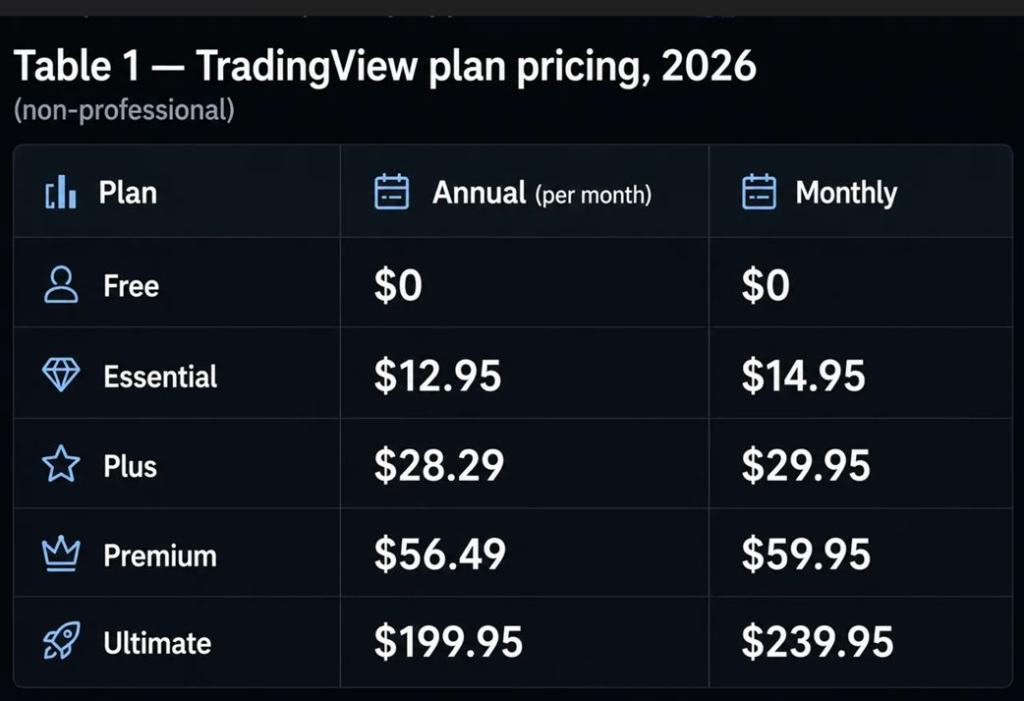
| TradingView | Cboe BZX free on all tiers; primary NYSE/NASDAQ via add-on (~$9.95/mo bundle) | Free; paid $14.95–$239.95/mo + data | Pine Script | Multi-asset breadth, community scripts |
| TakeProfit | NYSE/NASDAQ/NYSE Arca included on paid plan (per company) | Free; All-In $20/mo or $100/yr | Indie (Python dialect) | US stocks + crypto, flat pricing |
| Thinkorswim | Real-time with a funded brokerage account | Free with Schwab account | thinkScript | Options, Schwab clients |
| MetaTrader 5 | Real-time via broker (forex/CFD focus) | Free via supporting brokers | MQL5 | Forex and CFD traders |
The pattern is consistent: TradingView and Thinkorswim meter real-time access through tiers or accounts; flat-fee platforms bundle it. None of these is a single “best” — the right pick depends on asset class and classification.
Best TradingView Alternatives 2026 by Use Case
There is no one best-overall TradingView alternative; the best alternatives diverge across asset classes. The shortlist by intent:
- Best for US stocks (data cost): A flat, data-inclusive platform such as TakeProfit if you need primary-exchange feeds; TradingView if the free Cboe feed is enough.
- Best for crypto: TradingView or TakeProfit — both stream real-time crypto across major exchanges, and both suit crypto traders who also chart equities.
- Best for forex: MetaTrader 5 (or cTrader) remains the default for forex traders, with mature automation and a deep indicator marketplace.
- Best for options: Thinkorswim, for its options analytics and thinkScript studies.
- Best free version: TradingView’s free tier (real-time Cboe data) and TakeProfit’s no-cost plan are both credible starting points for a beginner.
Beyond price feeds, the evaluation runs on familiar axes: charting and technical indicators, alerts, strategy backtesting and automation, fundamental analysis through a stock screener, historical data depth, customizable workspaces, and how portable your existing trading strategies are when a platform rewrites Pine Script into its own syntax. Advanced features and primary-exchange data tend to sit on the paid tier; the rest of the trading tools are broadly comparable.
How to Choose: A Quick Decision Flow
Four questions settle most of it:
- Is the free Cboe feed enough? If you chart large caps on higher timeframes, likely yes — and your data cost is $0 on TradingView. If you scalp and read volume, you need primary-exchange data, and the bill starts.
- What asset class dominates your trading? Stocks and crypto point to flat-fee charting platforms; forex points to MetaTrader; options point to Thinkorswim.
- Are you a professional subscriber? If so, exchange fees jump 5 to 80 times — confirm your classification before you assume retail pricing.
- Flat price or à la carte? If you want one predictable number with primary-exchange data inside it, a flat TradingView pricing alternative wins; if Cboe data suffices, the cheapest credible option is the incumbent’s free tier.
Why Market Data Is the Line That Decides the Winner
The broader point is not which logo wins. It is that market-data economics, long treated as plumbing, have become a competitive surface. Zero commissions removed the broker’s toll; fragmentation and tiered exchange fees rebuilt a toll a layer up the stack, where it is harder to see and easier to misprice.
Two forces are pushing on it. Off-exchange volume keeps climbing, which thins the lit-venue picture and raises the value of consolidated, primary-exchange data for serious intraday work. And flat-fee, data-inclusive pricing gives traders a way to buy that data without assembling an à la carte cart or tripping the professional-rate wire by accident.
Neither force makes the incumbent’s free feed worse than it is. For most retail charting and market analysis, Cboe data remains usable. But the era when real-time data was an afterthought is over. It is now a budget decision — and the traders who treat it as one, reading their own classification and their own billing statements before they subscribe, keep the cost from quietly eating the returns that zero commissions were supposed to protect.
FAQ: TradingView Alternatives and Market-Data Costs
Is TradingView free real-time?
Partly. TradingView streams real-time US stock data on every tier, including the free plan, sourced from Cboe’s BZX exchange (25%+ of US volume, per TradingView). Direct quotes from the primary exchanges — NASDAQ, NYSE, and NYSE Arca — are delayed 15 minutes until you buy them as a paid add-on.
Why is market data expensive?
Because exchanges, not platforms, set the fees, and they charge per venue and per subscriber. Retail rates are modest, but professional classification multiplies them — CME data jumps from about $7 to $548 a month. US equity volume is also fragmented across 16-plus exchanges, so reflecting the full tape means paying multiple primary feeds.
What is the real-time stock data cost on TradingView in 2026?
For non-professional retail users, individual US exchange feeds run about $2 to $10 a month, and the five-feed US Stock Markets Bundle lists at $9.95. Professional subscribers pay far more. Crypto and forex real-time data is included; primary US equity data is the part billed separately.
What is the best TradingView alternative in 2026?
There is no single best TradingView alternative. For flat-fee US stock and crypto charting with primary-exchange data included, TakeProfit is a strong fit; for forex, MetaTrader 5; for options, Thinkorswim. The best choice depends on your asset class, your data needs, and whether you are a professional subscriber.
Are there free TradingView alternatives?
Yes. TradingView’s own free tier streams real-time Cboe data, and several alternatives — including TakeProfit — offer permanent free plans for charting and analysis. Free versions typically cover charting and technical analysis; real-time primary-exchange data and advanced features sit on paid tiers.
Is TakeProfit cheaper than TradingView?
It depends on the data you need. For a trader who wants primary-exchange US feeds at annual billing, TakeProfit’s $100-per-year plan undercuts a TradingView subscription-plus-bundle setup near $275 to $300 — a saving of roughly $175 to $200. For a trader content with the free Cboe feed, the two are close, and the decision shifts to features.
Does TakeProfit include real-time NASDAQ and NYSE data?
According to the company, TakeProfit’s All-In plan includes real-time NYSE, NASDAQ, and NYSE Arca data with no separate exchange add-on, rather than defaulting to a Cboe feed. As with any data product, confirm the current feed and any non-professional conditions before relying on it for live trading.
Sources: TradingView market-data support and pricing pages; FinancialTechWiz, “TradingView Real-Time Data Cost” (2026); CheckThat.ai, “TradingView Pricing 2026”; Cboe Global Markets US equities market statistics and insights; Nasdaq US equity market-data whitepaper (4Q24 share data); Bloomberg (off-exchange volume, January 2025); company disclosures and 2026 launch coverage (GlobeNewswire, PR Newswire).
Enjoy Worthview?
Add Worthview as a Preferred Source on Google to see more of our stories in Search.

Worthview Editorial Team is the shared byline for content created collaboratively by Worthview’s editors and contributors. Since 2008, we’ve published thousands of articles across technology, AI, finance, health, home, travel, and lifestyle. Our editorial process emphasizes original research, reputable sources, regular content updates, and clear attribution. Articles covering higher-trust topics, including health and finance, may also undergo review by qualified subject-matter experts.