Artificial intelligence has evolved rapidly over the past few years. We started with AI chatbots that could answer questions, generate text, and help us write emails. Then came AI assistants capable of coding, summarizing documents, and analyzing data.
Now, OpenAI is taking the next big step.
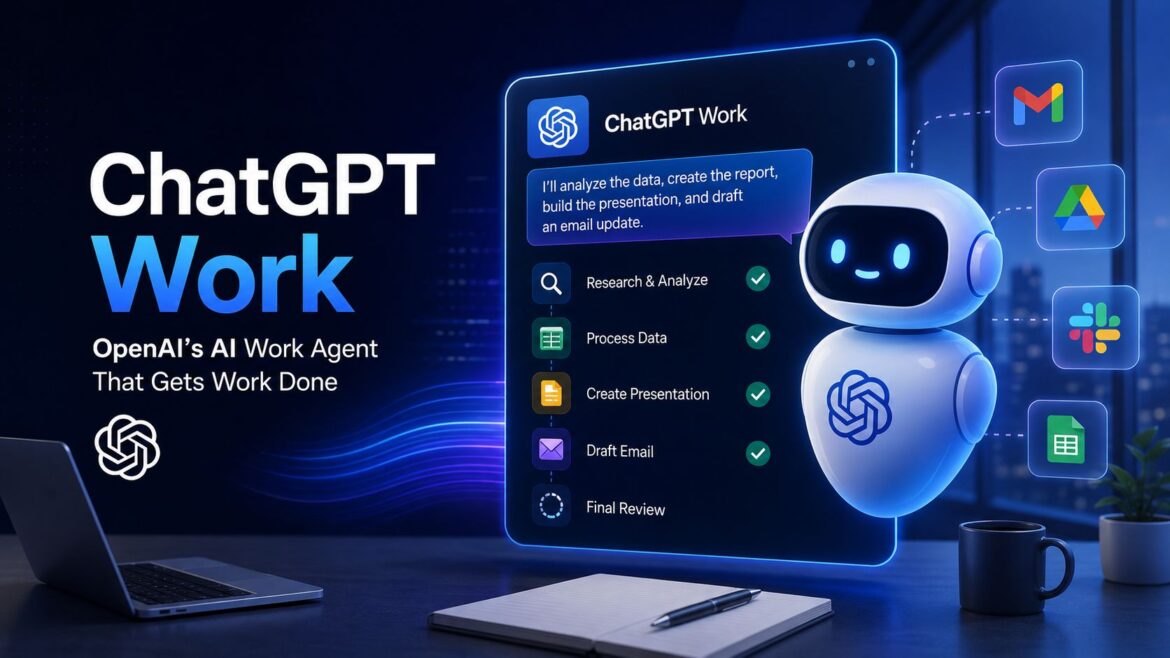
With the launch of ChatGPT Work, the company is moving beyond AI conversations and into AI-powered workplace automation. Instead of simply responding to prompts, ChatGPT Work is designed to complete entire projects, collaborate with your workplace tools, and act more like a digital coworker than a chatbot.
This marks one of OpenAI’s most ambitious product launches since ChatGPT itself.
In this guide, we’ll explore what ChatGPT Work is, how it works, its key features, real-world use cases, how it compares to ChatGPT, and why it could change the future of office work.
What Is ChatGPT Work?
ChatGPT Work is OpenAI’s AI-powered work assistant designed for professionals, teams, and businesses.
Unlike the standard version of ChatGPT, which primarily answers questions and generates content based on your prompts, ChatGPT Work can plan tasks, gather information from connected applications, create documents, analyze data, generate presentations, and assist with complex workflows that involve multiple steps.
Think of it as an AI employee that can work alongside you instead of simply chatting with you.
Rather than asking multiple questions one by one, you can assign ChatGPT Work an objective such as:
“Analyze last month’s sales data, compare it with the previous quarter, identify the biggest growth opportunities, create a presentation for management, and draft an email summarizing the findings.”
Instead of returning a single response, ChatGPT Work breaks the assignment into smaller tasks, works through them methodically, and produces complete deliverables.
That’s a significant leap from traditional AI chatbots.
Why Did OpenAI Build ChatGPT Work?
For most people, ChatGPT is already a powerful productivity tool.
However, businesses increasingly need AI that can do more than answer isolated questions.
Employees often spend hours switching between applications:
- Reading emails
- Searching documents
- Creating spreadsheets
- Writing reports
- Building presentations
- Researching competitors
- Updating project management tools
OpenAI recognized that modern work isn’t a single prompt—it’s a series of connected tasks.
ChatGPT Work is designed to bridge those tasks into one continuous workflow.
Instead of helping with individual steps, it helps complete the entire process.
How Is ChatGPT Work Different from ChatGPT?
Although they share the same underlying AI technology, their purpose is different.
ChatGPT focuses on conversations.
You ask.
It answers.
You ask again.
ChatGPT Work focuses on outcomes.
You describe your goal.
It plans the work, gathers information, uses connected tools, creates deliverables, and keeps you updated throughout the process.
It’s the difference between asking someone for directions and asking them to organize the entire trip.
How Is ChatGPT Work Related to AI Agents?
To understand ChatGPT Work, it’s helpful to first understand what an AI agent is.
A traditional AI chatbot responds to a prompt and waits for your next instruction. Every step of a task requires another question from you.
For example, if you ask ChatGPT to create a marketing report, you might need to:
- Upload sales data.
- Ask it to analyze the numbers.
- Request charts.
- Ask for a presentation.
- Finally, ask it to draft an email summarizing the findings.
Each step is separate, and you guide the entire process.
An AI agent works differently.
Instead of waiting for instructions after every step, it starts with a goal and determines the sequence of actions needed to achieve it. It can plan tasks, use connected tools, gather information, create deliverables, and adapt as new information becomes available—all while keeping you informed of its progress.
This is exactly where ChatGPT Work fits in.
Rather than functioning as a chatbot, ChatGPT Work acts as an AI work agent. You assign it an objective, and it handles many of the intermediate steps automatically.
For example, imagine you say:
“Prepare a quarterly SEO performance report for my website.”
A traditional chatbot would wait for you to provide each dataset and ask follow-up questions.
ChatGPT Work, acting as an AI agent, could:
- Retrieve data from connected sources such as Google Drive or analytics reports.
- Analyze traffic trends and keyword performance.
- Identify the most significant changes.
- Generate charts and summaries.
- Create a presentation for stakeholders.
- Draft an email highlighting the key findings.
- Notify you when everything is ready for review.
Instead of helping with one task at a time, it manages an entire workflow.
This goal-oriented approach is what distinguishes AI agents from conversational AI.
As AI technology evolves, experts believe AI agents will become increasingly common in business environments, taking responsibility for repetitive, multi-step processes while allowing people to focus on decision-making, creativity, and collaboration. ChatGPT Work is one of OpenAI’s clearest examples of this transition from AI assistant to AI agent.
Who Can Access ChatGPT Work?
At launch, ChatGPT Work is being rolled out in phases rather than becoming instantly available to all ChatGPT users.
OpenAI has started with organizations and business customers, with access expanding gradually to additional user groups over time. This staged rollout allows the company to gather feedback, monitor performance, and refine the product before wider availability.
While availability may vary by region and subscription plan, the initial rollout focuses on:
- Enterprise customers
- ChatGPT Edu organizations
- Business teams
- Selected Pro users (as availability expands)
If you’re using a personal ChatGPT account, you may need to wait until OpenAI extends access to your subscription tier.
How to Access ChatGPT Work
Once ChatGPT Work is available for your account, you can access it directly from the ChatGPT interface.
To get started:
- Sign in to your ChatGPT account.
- Ensure you’re using a supported subscription plan.
- Connect the workplace apps you want ChatGPT Work to use, such as Gmail, Google Drive, Slack, or other supported business tools.
- Grant only the permissions you’re comfortable sharing.
- Assign a goal instead of a single prompt—for example:
“Analyze this month’s sales reports, summarize customer feedback from Slack, create a presentation with key insights, and draft an email for the leadership team.”
ChatGPT Work will then plan the workflow, gather information from the connected sources, complete the requested tasks, and keep you informed throughout the process. For sensitive actions or requests that require confirmation, it may ask for your approval before proceeding.
As OpenAI continues expanding the rollout, additional integrations, supported applications, and subscription plans are expected to become available.
Key Features of ChatGPT Work
1. Multi-Step Task Planning
One of the biggest upgrades is the ability to manage long, complex workflows.
Instead of requiring detailed prompts for every step, ChatGPT Work can create a plan, execute individual tasks, and adapt as new information becomes available.
This makes it particularly useful for projects that would normally require hours of manual effort.
2. Integration with Workplace Apps
ChatGPT Work is designed to connect with workplace platforms such as:
- Gmail
- Google Drive
- Slack
- CRM systems
- Document repositories
- Productivity tools
Rather than copying and pasting information between applications, the AI can work directly with connected data while respecting organizational permissions.
3. Document Creation
ChatGPT Work can generate:
- Reports
- Business proposals
- Research summaries
- Project documentation
- Meeting notes
- Marketing plans
- Standard operating procedures (SOPs)
Instead of producing isolated paragraphs, it can organize information into complete, structured documents.
4. Spreadsheet Analysis
Business users frequently work with spreadsheets.
ChatGPT Work can help:
- Analyze trends
- Clean data
- Create summaries
- Identify anomalies
- Generate charts
- Produce executive insights
This reduces the time spent manually reviewing large datasets.
5. Presentation Generation
Rather than writing content alone, ChatGPT Work can also prepare presentation-ready material by organizing findings into logical sections suitable for meetings and executive reviews.
6. Research Assistant
Research often involves reading dozens of sources before reaching meaningful conclusions.
ChatGPT Work helps automate much of that process by collecting information, organizing it into themes, highlighting key insights, and producing concise summaries with supporting references where appropriate.
7. Long-Running AI Tasks
Traditional chatbots typically respond within seconds.
ChatGPT Work is designed for assignments that may take considerably longer.
It can continue working on complex projects, update you on progress, and request approval before taking important actions.
This makes it feel much closer to collaborating with a human colleague.
Real-World Use Cases
Marketing Teams
- Campaign planning
- Competitor analysis
- Content calendars
- SEO research
- Social media reports
Sales Teams
- Lead analysis
- CRM summaries
- Sales forecasting
- Client presentations
Developers
- Code generation
- Debugging
- Documentation
- Architecture planning
HR Teams
- Job descriptions
- Interview questions
- Employee onboarding
- Policy documents
Finance
- Expense analysis
- Forecasting
- Financial reports
- Budget summaries
Executives
- Board presentations
- Business reports
- Market research
- Strategic planning
Why This Matters
ChatGPT Work represents an important shift in how AI is used.
For years, AI has acted as a digital assistant.
Now, it’s beginning to function as a digital collaborator.
Instead of helping people perform individual tasks faster, AI is starting to complete entire workflows with minimal supervision.
This change could significantly improve productivity while allowing employees to focus on higher-value work.
Is ChatGPT Work Replacing Employees?
Probably not.
Its purpose is better understood as augmentation rather than replacement.
Many jobs involve creativity, judgment, collaboration, relationship building, and decision-making—areas where human expertise remains essential.
ChatGPT Work is better suited for repetitive, time-consuming tasks that often consume a large portion of the workday.
The most likely outcome is that professionals who effectively use AI agents will become more productive than those who don’t.
Who Should Use ChatGPT Work?
ChatGPT Work is particularly valuable for:
- Business professionals
- Marketing teams
- Software developers
- Consultants
- Researchers
- Startup founders
- Project managers
- Enterprise organizations
If your work involves documents, data, communication, or project coordination, ChatGPT Work has the potential to automate a significant portion of your routine tasks.
The Future of AI at Work
ChatGPT Work is more than another product launch.
It reflects a broader transformation taking place across the AI industry.
We’re moving from AI that answers questions to AI that completes work.
In the coming years, we’ll likely see AI agents coordinating meetings, managing projects, preparing reports, analyzing business data, and collaborating with humans across nearly every profession.
ChatGPT Work is one of the clearest signs that this future is arriving sooner than many expected.
Final Thoughts
ChatGPT Work isn’t just an upgraded chatbot—it’s OpenAI’s vision for how AI will fit into the modern workplace.
By combining advanced reasoning, long-running task execution, workplace integrations, document creation, data analysis, and project automation, it moves AI beyond conversations and into meaningful collaboration.
Whether you’re a business leader, developer, marketer, or entrepreneur, ChatGPT Work offers a glimpse of a future where AI becomes a trusted teammate rather than just another software tool.
As AI continues to evolve, the question may no longer be “Can AI help me?” but rather “What work should I delegate to AI today?”
Enjoy Worthview?
Add Worthview as a Preferred Source on Google to see more of our stories in Search.

Sethuram Kishore is the founder and editor of Worthview, an online publication established in 2008. With over 18 years of experience in SEO, digital marketing, and online publishing, he writes about AI, technology, business, and digital trends. He is also the founder of MoneyHulk, a personal finance and business publication.