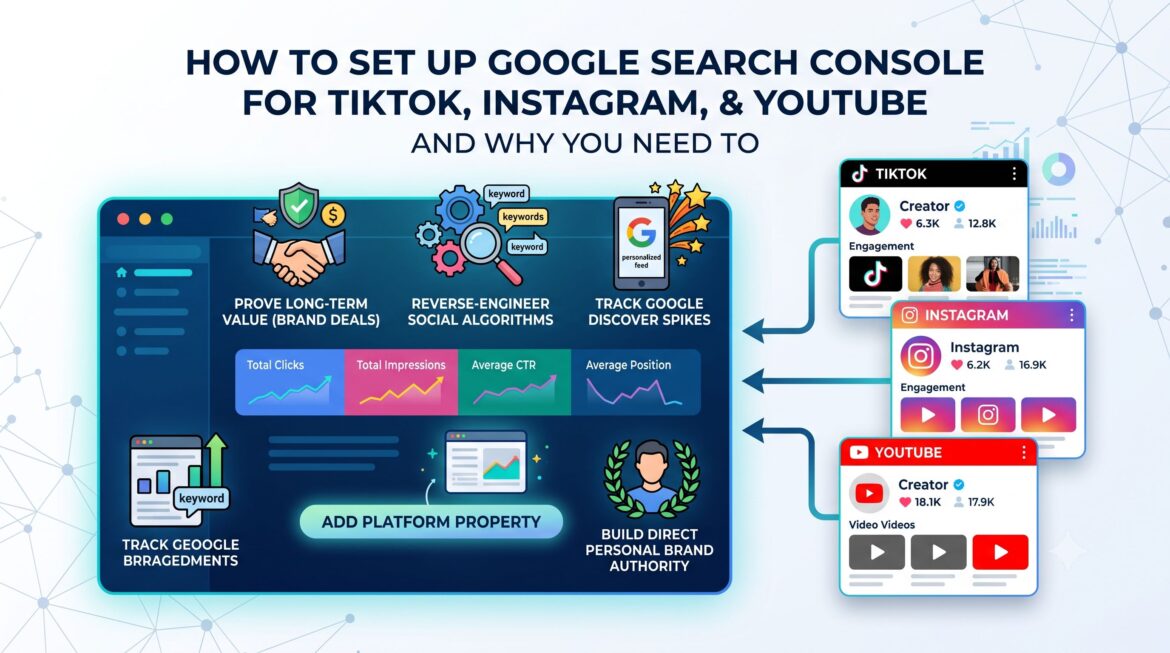
For years, Google Search Console (GSC) was a tool built exclusively for website developers and technical SEO professionals. If your primary business lived on Instagram, TikTok, YouTube, or X (formerly Twitter), you were completely blind to how much organic traffic Google was driving to your social media profiles.
That has completely changed. Google has rolled out Platform Properties, a game-changing feature that allows content creators and social media influencers to track exactly how their native social profiles and videos perform across Google Search and the Google Discover feed.
If you are an independent creator, this means you can finally treat Google as a major traffic channel without needing to build or manage a traditional website. Here is a complete guide to how this update benefits your personal brand and a step-by-step tutorial on how to get it set up.
📌 Key Takeaways
-
The Blind Spot is Gone: Creators no longer need a standalone website to use Google Search Console; you can now track native Instagram, TikTok, and YouTube profile performance directly through “Platform Properties”.
-
Evergreen Content Proof: You can use verified search data to show brands that your videos drive continuous, long-term traffic from Google long after they have faded from chronological social feeds.
-
Double-Dip on SEO Keywords: Search Console reveals the exact user search terms driving traffic to your content, allowing you to reuse those high-intent keywords in your social captions, video titles, and tags to trick both Google and social algorithms.
-
Unmask “External” Traffic: The tool isolates data from Google Discover, giving you direct insight into when and why your social media videos are being pushed to millions of users’ mobile home screens.
-
Two Simple Ways to Connect: Integration is seamless—either claim your channels automatically when prompted inside Search Console Insights or add your direct profile links manually through the “Platform Property” setup window.
How “Platform Properties” Directly Helps Influencers: 4 Major Benefits
While Search Console might look like an analytics tool for data geeks, it solves some of the biggest frustrations modern digital creators face. Here is exactly how tracking your social search appearance changes your business model:
1. Prove Your Long-Term Value for Brand Deals
Most social media algorithms favor short-term recency—a TikTok or Instagram Reel usually gets 80% of its views within the first 48 hours before fading from the feed.
-
The Search Advantage: Google Search is evergreen. If your sponsored video or profile ranks on Google for a high-intent query like “best budget travel gear,” it will continue to attract organic views for months or even years.
-
The Payoff: You can open up your Search Console dashboard, capture a screenshot of the steady stream of long-tail Google traffic your content receives, and prove to brand partners that sponsoring your channels offers continuous, long-term ROI far beyond a temporary algorithmic spike.
2. Reverse-Engineer Social Algorithms Using Search Intent
Social media apps are evolving into search engines, with millions of Gen Z and Millennial users using TikTok or YouTube to find information instead of traditional web browsers.
-
The Search Advantage: Search Console provides a precise list of the exact words, phrases, and user intents driving clicks to your videos.
-
The Payoff: You can take these high-performing search terms and plug them directly back into your social media strategy. By incorporating these exact keywords into your video titles, captions, on-screen text, alt tag descriptions, and spoken video hooks, you boost your visibility inside the social apps’ native search algorithms and on Google simultaneously.
3. Track Massive Organic Traffic Spikes via Google Discover
Google Discover is a personalized, highly visual feed that pops up on the home screen of millions of mobile devices. Google frequently surfaces viral short-form videos and trending social posts directly into this real estate.
-
The Search Advantage: Previously, if your video went viral via Google Discover, your native social analytics would simply bucket it as mysterious, unhelpful “external traffic.”
-
The Payoff: Search Console isolates your Discover data. You can see exactly which of your videos got picked up by Google’s mobile homepage, measure how many impressions and clicks it generated, and analyze what style of content triggers those massive traffic spikes so you can replicate them.
4. Audit Your Personal Brand Authority
As an influencer or digital publisher, your name and your handle are your core business assets.
-
The Search Advantage: When fans, agencies, or companies look up your name on Google, you want to make sure your most active, monetized, and optimized platforms appear first.
-
The Payoff: This tool lets you track exactly how people find your brand online. You can see whether Google is prioritizing your YouTube, TikTok, or Instagram profile for branded searches, helping you understand where your strongest search authority lies and ensuring your digital front door is fully optimized.
Step-by-Step: How to Set Up Your Social Channels in Search Console
Google is rolling this feature out gradually, beginning with an automated identification experiment within Search Console Insights and scaling up to dedicated account creation. Because you don’t own the underlying code of a third-party social app, verification is handled differently than a traditional website.
Method A: The Automated “Insights” Method (Easiest)
Google automatically scans the web to identify which social profiles are explicitly linked to your established digital footprint.

Method B: Manual Profile Property Addition
If the automated prompt hasn’t appeared for your account yet, you can claim your channel manually as the feature rolls out to your dashboard:
-
Click the Property Selector drop-down menu in the top-left corner of your Search Console interface.
-
Select Add Property from the menu options.
-
Choose the new Platform Property type from the configuration panel.
-
Input your exact social profile URL (e.g.,
[https://www.instagram.com/yourhandle/](https://www.instagram.com/yourhandle/)or your native YouTube channel URL). -
Follow the quick native integration check (such as logging into the respective platform or ensuring your profile page publicly links back to your verified email address) to confirm digital ownership.
Read the Data Like a Pro: 3 Key Metrics to Monitor
Once your social property is live and logging performance data, avoid getting overwhelmed by the charts. Focus on three core areas to maximize your search growth:
-
Queries: Look at the exact terms driving impressions and clicks to your videos. If people are finding your travel profile through the query “hidden spots in South India,” you have clear keyword validation on what content pillar to double down on next.
-
Device Performance: Social media content is inherently mobile-first. If you notice an unexpectedly high number of impressions coming from desktop search, it indicates that your content is being used for deep-dive research or tutorials—meaning longer, more comprehensive video structures will perform better.
-
The “Video” Filter: Use the Search Appearance filter to isolate standard web results from the dedicated Video Tab on Google. High performance in the Video Tab means your native video thumbnails and titles are successfully catching eyes against traditional blog posts.
The Takeaway:
The line between a traditional web publisher and a social media creator has completely dissolved. By claiming your Platform Properties in Google Search Console, you stop leaving your organic visibility to chance and turn Google into one of your strongest top-of-funnel content distribution channels.
Frequently Asked Questions
How can I use Google Search Console if I don’t own a website?
You can use it by linking your social media channels as Platform Properties. Simply log in to Search Console, add a new property, paste your profile link, and complete the quick platform authentication. You do not need to own a domain or write any code.
Which social media platforms are supported by Google Search Console?
Currently, Google Search Console natively tracks performance for four major platforms:
- TikTok
- YouTube
- X (formerly Twitter)
How long does it take for social media data to show up in Search Console?
It typically takes a few days for data to begin populating your dashboard after initial setup. Tracking begins the moment you attempt verification, so do not worry if your graphs are empty for the first 48 hours.
Can I track my Instagram Stories or TikTok views inside Google Search Console?
No. Search Console does not track your native, in-app social media views or feed engagement. It only tracks impressions and clicks generated when your social content surfaces directly on Google Search, the Video Tab, or the Google Discover mobile feed.
What counts as a click or impression for a social video on Google?
-
Impressions: Triggered every time your social video thumbnail or profile link appears on a user’s screen in Google Search or Discover results.
-
Clicks: Triggered whenever a user taps your content from the Google results page, whether it opens the native app or plays in Google’s built-in media previewer.
Can I export my social search data to show brand partners?
Yes. You can export your organic search queries, impressions, and clicks into a CSV or spreadsheet directly from the dashboard. This makes it easy to add evergreen search metrics straight into your brand pitch decks and media kits.
What should I do if my social platform connection gets paused?
If your connection pauses, it is usually because a platform login session expired. Simply go to your property settings, click re-verify, and log back into your social account. Your data tracking will instantly resume without losing any historical metrics.
Enjoy Worthview?
Add Worthview as a Preferred Source on Google to see more of our stories in Search.

Sethuram Kishore is the founder and editor of Worthview, an online publication established in 2008. With over 18 years of experience in SEO, digital marketing, and online publishing, he writes about AI, technology, business, and digital trends. He is also the founder of MoneyHulk, a personal finance and business publication.




One thought on “How to Set Up Google Search Console for TikTok, Instagram, and YouTube (And the Benefits)”
Comments are closed.