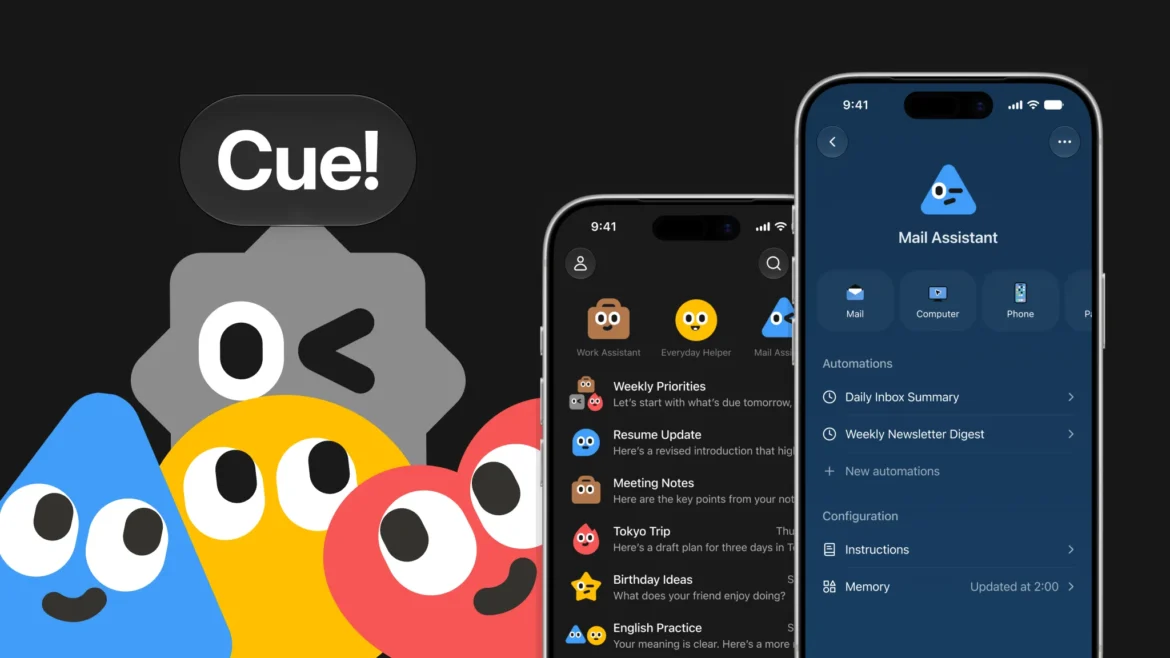
Most AI assistants wait for you to give them a prompt. Manus Cue is designed to do more: each personal AI agent gets its own email address, phone number, wallet and computer so it can communicate and carry out tasks on your behalf.
Manus introduced Cue on September 28, 2026, alongside Manus 2.0. The standalone app is aimed at persistent personal agents that can continue working beyond a single chat session.
But giving an AI agent an identity, communications access and the ability to spend money also creates new security and control questions.
Here’s what Manus Cue is, how it works, how to get early access, what you can use it for, and what to consider before giving an agent real-world permissions.
Key Takeaways
- Manus Cue is a standalone app for personal AI agents designed to act on your behalf rather than simply answer questions.
- Each Cue agent can have its own email address, phone number, wallet and computer.
- Agents can communicate, handle phone calls, collaborate with other agents and perform multi-step tasks.
- Cue is currently in early access, with Manus initially offering access through the invite code MEETCUE.
- Because Cue can interact with communications and money, users should start with limited permissions and a small budget.
What Is Manus Cue?
Manus Cue is a standalone personal-agent app from Manus that gives AI agents their own digital identity and resources for carrying out tasks.
Unlike a conventional chatbot, Cue is designed around agents that can persist and act over time.
According to Manus, each agent can have its own:
- Email address
- Phone number
- Wallet
- Computer
That means the agent does not necessarily have to operate through your personal accounts for every task. It can communicate under its own identity and use its own working environment.
The concept is part of Manus’ broader move toward agentic AI—AI systems that can plan, use tools and execute tasks rather than simply generate text.
What Does a Cue Agent Get?
The four resources are central to Cue’s concept.
| Resource | What the agent can use it for |
|---|---|
| Email address | Send and receive messages using an identity separate from your personal inbox |
| Phone number | Make or receive calls and handle certain text-based communication |
| Wallet | Make payments within the budget and permissions configured for the agent |
| Computer | Work inside its own computing environment and perform multi-step tasks |
The exact availability of some capabilities can vary by region and implementation, particularly phone support and payment functionality.
The wallet also deserves particular caution. Public launch coverage has described it as a digital wallet, while some reports have characterized it more specifically as a cryptocurrency wallet. Manus’ launch material does not fully explain the underlying payment rails, so users should verify exactly how the wallet works before adding funds.
Why Is Cue Different From a Normal AI Assistant?
A normal AI assistant generally works like this:
You ask → AI responds → You take action.
An agentic system aims for:
You set a goal → AI plans → AI uses tools → AI takes actions → AI reports back.
Cue pushes that model further by giving an agent resources that resemble the things a human delegate would need to operate independently.
For example, instead of asking an AI:
“Find a restaurant and tell me which one I should book.”
You could potentially give an agent a task where it researches options, communicates with the restaurant and handles parts of the booking process.
That distinction is important because the value—and the risk—of an agent increases as the number of actions it can perform increases.
What Can Manus Cue Do?
1. Create a Team of AI Agents
Cue supports multiple agents working toward a shared objective.
For example, Manus describes an event-planning scenario where different agents could handle different parts of the job:
- One researches venues.
- Another compares options.
- Another prepares presentation material.
- Agents share information with each other.
- You remain involved in the final decision.
This is closer to an AI team than a single chatbot.
2. Handle Phone Calls
A Cue agent can use a phone number to handle certain calls and provide you with a summary afterward.
This could be useful for routine communications such as:
- Delivery follow-ups
- Appointment confirmations
- Booking-related calls
- Basic information requests
Phone availability is not necessarily identical in every country, so users should check whether the feature is supported in their region.
3. Use Email Under Its Own Identity
Instead of giving an agent direct control over your primary inbox, Cue’s model allows an agent to have its own email identity.
That could make it useful for tasks such as:
- Receiving vendor messages
- Handling newsletters
- Managing routine communications
- Following up on simple requests
It also creates an important security boundary: users should understand exactly what incoming messages the agent can read and what instructions it is allowed to act upon.
4. Make Payments Within a Budget
One of Cue’s most notable capabilities is the ability for an agent to make payments within a defined budget.
This changes the nature of an AI assistant.
A chatbot can recommend a product.
An agent with payment capability can potentially complete the transaction.
For that reason, the amount of money available to the agent and the rules governing individual transactions are important questions to understand before using the feature.
5. Work From Its Own Computer
Cue agents can have their own computing environment for carrying out tasks.
That allows an agent to perform multi-step work rather than simply returning a response to you.
This fits into Manus 2.0’s broader computer-use strategy, which includes Cloud Computer and other tools for persistent workloads.
Manus Cue Use Cases
Some of these use cases are based on Cue’s documented capabilities, while others are practical ideas that users could test as the product develops.
Research Assistant
You could give different agents different research responsibilities.
For example:
- Agent A collects information.
- Agent B checks sources and identifies gaps.
- Agent C organizes the findings.
- You review the final output.
This could be particularly useful for research-heavy work.
Email Front Desk
A separate agent email address could act as a front door for routine communications.
For example, vendors or services could contact the agent rather than your personal inbox.
The agent could then summarize important messages and escalate anything requiring your attention.
Appointment and Booking Assistant
A phone-enabled agent could potentially handle routine appointment communications and report the outcome back to you.
This is an example where the agent’s phone identity becomes more useful than simply having access to a chatbot.
Low-Budget Errands
A sensible early experiment would be to give the agent a very small spending limit and let it handle one low-risk purchase or transaction.
This provides a way to understand how the payment workflow works before giving the agent a larger budget.
How to Get Manus Cue
Cue is currently in early access rather than being generally available.
The launch process reported for early users is:
- Visit the Manus website and look for Cue.
- Sign up for access.
- Enter an available invite code.
- The launch code published by Manus was MEETCUE.
- Early access was initially limited, so the code may no longer work once the allocation is exhausted.
- Users who gain access can receive additional invitation codes to share.
Current reporting indicates that the initial early-access program was limited to around 1,000 users.
Cue is available across web, desktop and mobile, although availability can differ between platforms. iOS availability was still subject to App Store approval around launch.
Is Manus Cue Free?
Cue is free during its early-access period, but Manus has not announced its long-term pricing.
That means users should not assume that the current early-access experience will remain free.
The same applies to related Manus 2.0 features such as Cloud Computer, which is a separate resource that can be purchased for persistent workloads.
If you are considering Cue for business operations, it is better to treat the current period as an evaluation phase rather than build a critical workflow around an unannounced pricing model.
What Is Manus 2.0 and How Does It Relate to Cue?
Cue launched alongside Manus 2.0, which introduces a broader set of agent capabilities.
The major Manus 2.0 additions include:
Cascade
Cascade is Manus’ new in-house agent harness.
Manus says that in one tested configuration, Cascade used 23.2% fewer tokens, completed tasks 28.2% faster and cost 32% less to operate than its previous system.
Those numbers come from a specific test configuration and should not be interpreted as a universal benchmark.
Automations
Manus 2.0 expands scheduled automation into event-triggered workflows.
An event such as:
- A new email
- A calendar event
- A Slack message
- A Notion update
can trigger a workflow.
This is particularly relevant to agentic AI because the system can start work when something happens rather than waiting for a user to issue a prompt.
Cloud Computer
Cloud Computer provides a dedicated environment for workloads that need to continue running even when the user’s local computer is closed.
Manus gives examples such as persistent automations and game servers.
Manus Studio
Manus Studio provides a workspace for creating and working with different types of projects, including documents, websites, videos and games.
Together, these features show that Manus 2.0 is not simply a model upgrade. It is an attempt to build a broader agent platform around persistent work and automation.
Is Manus Cue Safe?
Cue should be treated as a higher-risk AI tool than a normal chatbot because an agent can potentially receive messages, communicate externally and access money or other resources.
That does not mean Cue is inherently unsafe. It means the consequences of a mistake can be greater.
Prompt injection is one important concern.
In September 2026, security researchers at Salt Labs disclosed a Manus-related prompt-injection vulnerability in which malicious instructions delivered through email could lead to code execution and access to credentials for connected services. Salt Labs listed the issue as a Manus prompt-injection incident, while reporting indicated the vulnerability had been patched.
The broader lesson is important for any AI agent that reads external content:
An email, webpage or document can contain instructions that were written for the agent rather than for you.
That means an agent should not automatically treat every piece of information it encounters as a trusted command.
Frequently Asked Questions About Manus Cue
What is Manus Cue?
Manus Cue is a standalone app for creating and using personal AI agents. Each agent can have its own email address, phone number, wallet and computer.
Is Manus Cue available now?
Yes, but Cue launched in early access rather than as a fully open product. Access was initially limited and required an invitation code.
What is the Manus Cue invite code?
Manus published MEETCUE as an early-access invitation code at launch. Availability may be exhausted because the initial program was limited.
Is Manus Cue free?
Cue is free during its early-access period. Manus has not announced the long-term pricing for the service.
Can Manus Cue make phone calls?
Cue agents can use a phone number to make or receive certain calls and summarize the results. Phone availability depends on the supported region and product configuration.
Can Manus Cue send emails?
Yes. One of Cue’s defining features is an email identity that allows an agent to send and receive messages separately from the user’s personal inbox.
Can Manus Cue spend money?
Cue agents can make payments within a budget configured for them. The exact payment mechanism, approval controls and regional availability should be verified inside the product before funding a wallet.
What is Manus 2.0?
Manus 2.0 is a major Manus platform update that introduces the Cascade agent harness along with features including Automations, Cloud Computer, Manus Studio and Cue.
Is Manus Cue an AI chatbot?
Not exactly. Cue is designed as an agent platform. Instead of only responding to prompts, its agents are intended to perform tasks and interact with external systems.
Is Manus Cue safe to use?
Cue should be used carefully because its agents can have more permissions and capabilities than a conventional chatbot. Users should start with low-risk tasks, limited budgets and minimal account access.
The Bottom Line
Manus Cue is an early-access personal AI agent platform designed to give agents their own identity and resources—including email, phone, wallet and computer.
That makes Cue fundamentally different from an AI assistant that simply answers questions. The agent can potentially communicate, perform tasks and interact with the real world on your behalf.
The trade-off is that greater autonomy also creates greater consequences when an agent makes a mistake or encounters malicious instructions.
If you get access, the sensible approach is to start small: use a separate identity, set a low spending limit, test one workflow at a time and understand the permissions before giving the agent access to anything important.
Cue’s long-term significance will depend not only on what the agents can do, but also on how much control users, businesses and online platforms ultimately give them.
Sources
- Introducing Manus 2.0 (Manus)
- Manus Launches Cue Agents With Phone Numbers and Wallets (Implicator)
- Manus 2.0 and Cue give AI agents their own email, phone and wallet (The Next Web)
- Manus expands AI tools in renewed push into agent market (Bloomberg, via The Malaysian Reserve)
- Manus gives Cue agents phone numbers, wallets and computers (Runtime Wire)
- Manus 2.0 and Cue: What Manus Launched on Sept 28 (CellCog)
- Manus 2.0 Launch: Studio, Cue and Automations (explainx.ai)
- Meta and Manus Drive AI Toward Human-Like Identities (KuCoin)
Enjoy Worthview?
Add Worthview as a Preferred Source on Google to see more of our stories in Search.

Worthview Editorial Team is the shared byline for content created collaboratively by Worthview’s editors and contributors. Since 2008, we’ve published thousands of articles across technology, AI, finance, health, home, travel, and lifestyle. Our editorial process emphasizes original research, reputable sources, regular content updates, and clear attribution. Articles covering higher-trust topics, including health and finance, may also undergo review by qualified subject-matter experts.







One thought on “Manus Cue Explained: The AI Agent With Its Own Email, Phone Number and Wallet”