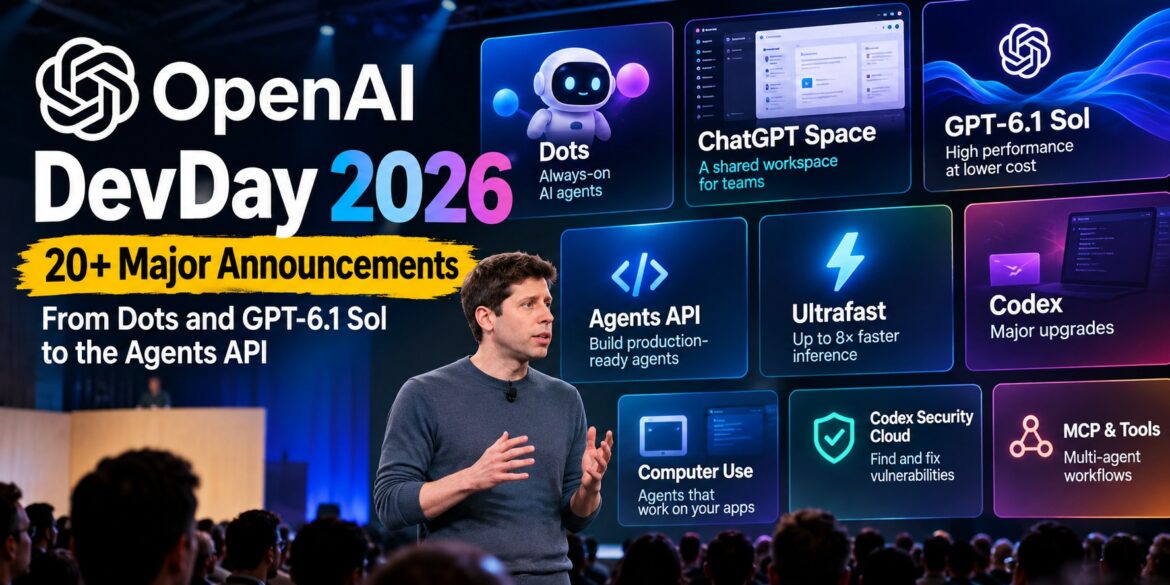
OpenAI DevDay 2026 introduced more than 20 announcements, with the biggest themes being always-on AI agents, agent development infrastructure, faster and cheaper models, ChatGPT workspaces, and major Codex upgrades.
Key Takeaways
- OpenAI introduced Dots, always-on AI agents designed to work on tasks in the background across connected apps.
- ChatGPT Space creates a shared workspace where people, ChatGPT and AI agents can work on projects together.
- GPT-6.1 Sol targets agentic coding, computer use and professional workloads at substantially lower token prices than GPT-6 Astra.
- The Agents API gives developers a managed agent runtime with environments, sessions, tools, MCP, context management and multi-agent capabilities.
- OpenAI also expanded Codex, introduced Ultrafast, added computer-use capabilities and announced new workflow and automation features.
What Did OpenAI Announce at DevDay 2026?
OpenAI used DevDay 2026 in San Francisco to showcase more than 20 new products, features and developer capabilities. The announcements covered several areas: AI agents, models, coding, ChatGPT workspaces, APIs, automation and enterprise collaboration.
The biggest theme running through the event was a shift from AI that simply responds to prompts toward AI that can plan, execute, monitor and continue work over time.
Here are the biggest announcements.
1. OpenAI Dots: Always-On AI Agents
Your dot is ready to meet you. pic.twitter.com/HyC9ZAztOm
— OpenAI (@OpenAI) September 29, 2026
The headline consumer and workplace announcement was Dots, OpenAI’s new always-on AI agents.
Unlike a conventional chatbot that waits for a user message, Dots are designed to continue working toward goals in the background. They can use their own cloud computer, interact with connected applications and keep track of progress.
OpenAI demonstrated Dots handling tasks such as creating websites and presentations, managing calendars and working with external applications.
Dots can be accessed through ChatGPT and can also interact through channels such as Slack and Microsoft Teams.
The first Dots are available to eligible Pro, Business Premium and Enterprise users, with additional enterprise availability depending on the rollout.
Why Dots matter
Dots represent an important change in how AI assistants are designed.
The traditional workflow is:
Prompt → Response
The agentic workflow is closer to:
Goal → Planning → Tool use → Execution → Monitoring → Result
That distinction is particularly important for businesses looking at AI automation.
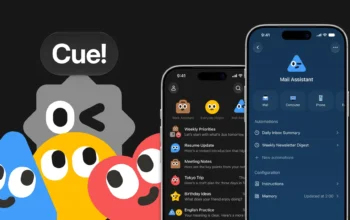
OpenAI isn’t alone in pushing AI agents toward greater autonomy. Manus recently introduced Cue, a personal AI agent with its own email address, phone number, wallet and computer, allowing it to communicate and carry out tasks on a user’s behalf. Read our full guide to Manus Cue
OpenAI also introduced ChatGPT Space, a collaborative environment designed for people and AI to work together on projects.
Instead of keeping work distributed across individual conversations and external applications, Space provides a shared location for a team’s project context, files and work.
One of the important additions is Pages, which can act as persistent documents that teams and AI can work on together.
OpenAI also demonstrated collaborative slides, allowing people and AI agents to work on presentations together. Slides can eventually be exported to formats such as PowerPoint and Google Slides.
ChatGPT Space is available on Pro, Business and Enterprise plans on the web and desktop.
The bigger idea
Space provides the environment in which AI agents such as Dots can become part of an ongoing team workflow.
Instead of:
Human asks AI → AI answers → human moves the result somewhere else
the model becomes:
Human + AI agents + shared context + shared workspace
3. GPT-6.1 Sol: A Cheaper Model for Agentic Work
OpenAI also introduced GPT-6.1 Sol, positioning it as a more cost-efficient model for demanding workloads.
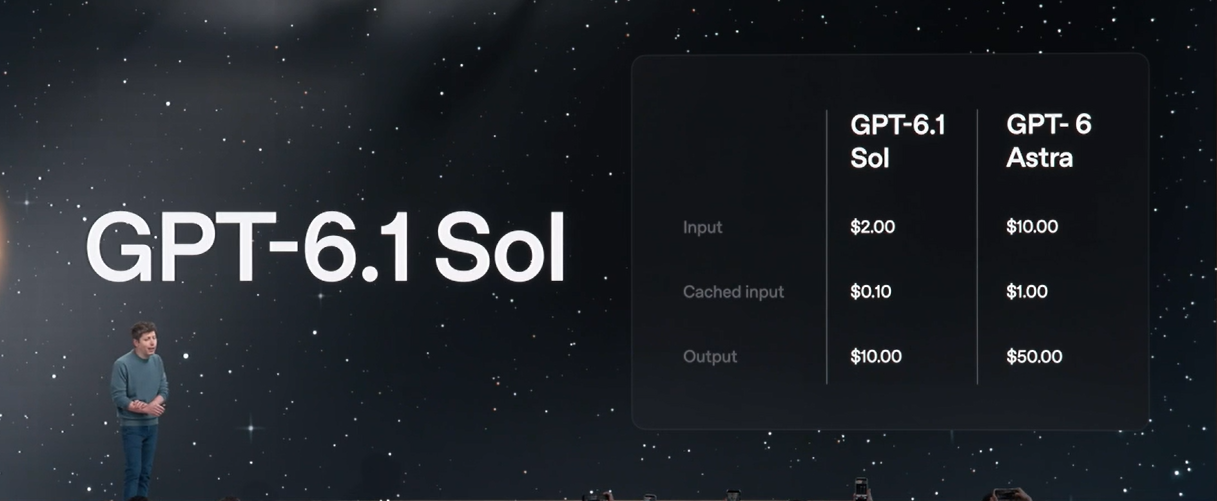
OpenAI says Sol nearly matches GPT-6 Astra on areas including agentic coding, computer use and professional work, while costing substantially less.
The pricing shown during the DevDay presentation was:
| Model | Input / 1M tokens | Cached input | Output / 1M tokens |
|---|---|---|---|
| GPT-6.1 Sol | $2 | $0.10 | $10 |
| GPT-6 Astra | $10 | $1 | $50 |
The cost difference is particularly important for agentic applications because an agent may make many model calls while completing a single task.
For developers building large-scale workflows, the economics of each model call can have a major effect on the total cost of an automated process.
4. Agents API: OpenAI’s Agent Runtime
For developers, one of the most important announcements is the Agents API.
OpenAI describes the Agents API as a way to build durable cloud agents using a managed Codex harness. OpenAI handles elements such as sessions, orchestration, context compaction and recovery, while developers define the agent’s tools and execution environment.
An agent can operate in a sandbox where it can:
- Execute code
- Edit files
- Connect to MCP servers
- Use tools
- Produce artifacts
- Maintain session state
- Work with other agents
The architecture is built around several concepts:
Agent → Environment → Session → Events and items
That gives developers a much more structured foundation for building long-running workflows instead of implementing every component themselves.
5. MCP, Tools, Skills and Multi-Agent Workflows
The Agents API architecture also brings together several technologies that are becoming central to agent development.
The DevDay presentation highlighted:
- MCP
- Tools and skills
- Memory and context
- Context compaction
- Environments
- Multi-agent workflows
OpenAI’s current Agents documentation confirms support for MCP servers, automatic context compaction, programmatic tool calling and multi-agent orchestration.
This matters because production agents need more than an LLM.
They need:
Model + memory + tools + environment + permissions + state + orchestration
That is increasingly becoming the standard architecture for serious agentic applications.
6. Computer Use Comes to Agents
Another significant developer update is computer use.
OpenAI expanded the Agents API so agents can interact with software environments rather than being limited to traditional API calls.
This opens the door to workflows where an agent can:
- Understand a task
- Open an application
- Navigate an interface
- Perform actions
- Inspect the result
- Continue the workflow
For automation developers, this potentially expands the range of systems an agent can operate.
Instead of requiring every application to expose a custom API, an agent can potentially interact with software through its interface.
7. Codex Gets a Major Upgrade
Codex was another major focus of DevDay.
OpenAI announced reusable cloud development environments, allowing teams to create shared environments with predefined settings and permissions.
Codex also received:
Voice-controlled CLI
Developers can now start and direct Codex tasks using voice.
/agents view
The new interface makes it easier to manage and delegate multiple Codex tasks.
Code review
Codex is gaining a dedicated code-review experience inside the ChatGPT desktop application.
Developers can inspect changes, ask Codex about potential issues and work with GitHub or GitLab workflows.
This pushes Codex beyond simple AI-assisted coding toward AI-assisted software engineering.
8. Codex Security Cloud
OpenAI also introduced Codex Security Cloud, aimed at finding and addressing security vulnerabilities in codebases.
It can scan entire GitHub repositories, investigate findings, remove duplicates and prepare fixes. It can also continue monitoring repositories for new commits.
The important part is that the security workflow can continue in the cloud rather than requiring a developer to keep their computer running.
9. Ultrafast: Faster AI Inference
OpenAI also expanded its Ultrafast service tier.
Ultrafast is designed for applications where latency is particularly important. OpenAI had previously previewed the technology with GPT-5.6 Sol, describing speeds of up to 750 output tokens per second in its early preview.
At DevDay, OpenAI positioned Ultrafast around its newest high-performance workloads, including Codex.
The new Pro 500 subscription includes access to GPT-6 Astra Ultrafast in ChatGPT Work and Codex, with OpenAI claiming up to 300 tokens per second in Codex and up to eight times the standard speed.
The API availability and specific model/service combinations are being rolled out separately.
10. A New $500 ChatGPT Pro Tier
OpenAI also announced ChatGPT Pro 500, priced at $500 per month.
The plan is aimed at users who need the highest usage allowance and access to the fastest processing tier.
It includes GPT-6 Astra Ultrafast in ChatGPT Work and Codex.
OpenAI is also changing the existing $200 Pro plan’s included Work and Codex usage. According to reporting on OpenAI’s announcement, the allowance will be reduced from 20× to 10× the Plus allowance from October 30.
11. ChatGPT Comes to Slack and Microsoft Teams
OpenAI is also making ChatGPT more accessible inside workplace communication.
Users can mention @ChatGPT inside Slack and Microsoft Teams channels, threads and direct messages.
This means teams don’t necessarily need to leave their existing communication environment to interact with ChatGPT.
Combined with Dots and Team Tasks, this creates an interesting workflow:
Slack/Teams event → AI agent → tools → action
That is much closer to an automated workplace assistant than a conventional chatbot.
12. Team Tasks Bring Event-Driven Automation
OpenAI also introduced Team Tasks for Business and Enterprise users.
These tasks can run according to a schedule or in response to an event, such as a new message appearing in a Slack channel.
That introduces another important concept for AI automation:
Event-driven agents
Instead of waiting for:
“Run this workflow.”
an automation can respond to:
“Something happened. Start the workflow.”
This is one of the fundamental patterns behind modern agentic automation.
13. Decisions API
OpenAI also announced a Decisions API, designed for fast, structured decision-making and classification tasks.
The API uses GPT-6 Luna to answer predefined questions with predefined answers, making it suited to workloads where the application needs a quick decision rather than a long-form response.
Potential use cases include:
- Classification
- Routing
- Moderation decisions
- Workflow branching
- Automated triage
- Simple business decisions
This type of specialized API can be useful in high-volume automation where using a more expensive reasoning model for every small decision would be inefficient.
14. OpenAI’s Bigger Agent Strategy
When these announcements are viewed individually, they can look like a collection of unrelated features.
Together, however, they reveal a much clearer architecture.
OpenAI now has pieces for:
Models
GPT-6 Astra
GPT-6.1 Sol
GPT-6 Luna
↓
Agents
Dots
Agents API
Codex agents
↓
Tools
MCP
Computer use
Skills
External applications
↓
Execution
Cloud environments
Sandboxes
Codex environments
↓
Memory & context
Sessions
Context management
Compaction
↓
Automation
Team Tasks
Events
Scheduled workflows
↓
Workspace
ChatGPT Space
Pages
Collaborative slides
That is a much more complete agent platform than simply adding another chatbot feature.
What OpenAI DevDay 2026 Means for AI Automation
The biggest takeaway from DevDay isn’t necessarily one individual product.
It is the direction of the platform.
AI systems are increasingly moving from:
Ask → Answer
to:
Goal → Plan → Use tools → Execute → Check → Continue
And the infrastructure announced at DevDay is designed around that second model.
For developers, this means the opportunity is shifting from simply building applications that call an LLM to building systems where AI agents can perform multi-step work.
That includes areas such as:
- AI workflow automation
- Customer support agents
- Research agents
- Coding agents
- Data analysis agents
- Security agents
- Business process automation
- Multi-agent systems
- Internal enterprise assistants
OpenAI’s Agents API documentation explicitly positions the platform around durable sessions, managed orchestration, environments, tools, MCP and multi-agent workflows.
OpenAI DevDay 2026: Frequently Asked Questions
What is OpenAI DevDay 2026?
OpenAI DevDay 2026 is OpenAI’s annual developer conference, held on September 29, 2026, in San Francisco. The event includes a keynote, technical sessions, demos and workshops focused on OpenAI’s developer products and tools.
What is Dots in OpenAI?
Dots are OpenAI’s always-on AI agents designed to work on assigned goals in the background, including tasks involving connected applications. They are powered by GPT-6 Astra.
What is ChatGPT Space?
ChatGPT Space is a shared workspace where teams can work with ChatGPT and AI agents on common projects, documents and presentations.
What is the Agents API?
The Agents API is an OpenAI developer platform for building durable cloud agents using a managed Codex harness. It handles areas such as sessions, orchestration, context compaction and recovery.
What is GPT-6.1 Sol?
GPT-6.1 Sol is a new OpenAI model positioned for agentic coding, computer use and professional workloads. OpenAI says it approaches GPT-6 Astra’s capabilities in these areas while being significantly cheaper.
What is OpenAI Ultrafast?
Ultrafast is a faster inference/service tier designed for workloads where latency matters. OpenAI previously previewed Ultrafast with speeds of up to 750 output tokens per second on GPT-5.6 Sol.
What is Codex Security Cloud?
Codex Security Cloud is designed to scan repositories for security vulnerabilities, investigate findings and prepare fixes, including through ongoing cloud-based monitoring.
Conclusion
OpenAI DevDay 2026 was less about launching one new chatbot and more about building the infrastructure for an agentic AI ecosystem.
Dots provide persistent agents. ChatGPT Space provides a shared environment. GPT-6.1 Sol provides a more cost-efficient model for demanding workloads. The Agents API provides developers with a managed runtime, while MCP, tools, computer use and multi-agent capabilities give those agents ways to interact with the world.
Codex is also moving deeper into autonomous software engineering, while Team Tasks, Slack and Teams integrations and event-driven workflows bring AI closer to everyday business operations.
The direction is becoming increasingly clear:
AI is moving from answering questions to doing work.
And for developers, the next wave may not be about building another chatbot. It may be about building the workflows, tools, environments and agents that allow AI to actually get things done.
Enjoy Worthview?
Add Worthview as a Preferred Source on Google to see more of our stories in Search.

Worthview Editorial Team is the shared byline for content created collaboratively by Worthview’s editors and contributors. Since 2008, we’ve published thousands of articles across technology, AI, finance, health, home, travel, and lifestyle. Our editorial process emphasizes original research, reputable sources, regular content updates, and clear attribution. Articles covering higher-trust topics, including health and finance, may also undergo review by qualified subject-matter experts.