Google just let an AI agent operate a browser the way you do — filling forms, comparing prices, finishing checkouts. For anyone who builds pages for a living, that quietly changes what “optimized” has to mean.
| For twenty years, SEO has optimized for one reader: a human, or a crawler pretending to be one. Gemini Spark just introduced a second reader — one that doesn’t just read your page. It acts on it. |
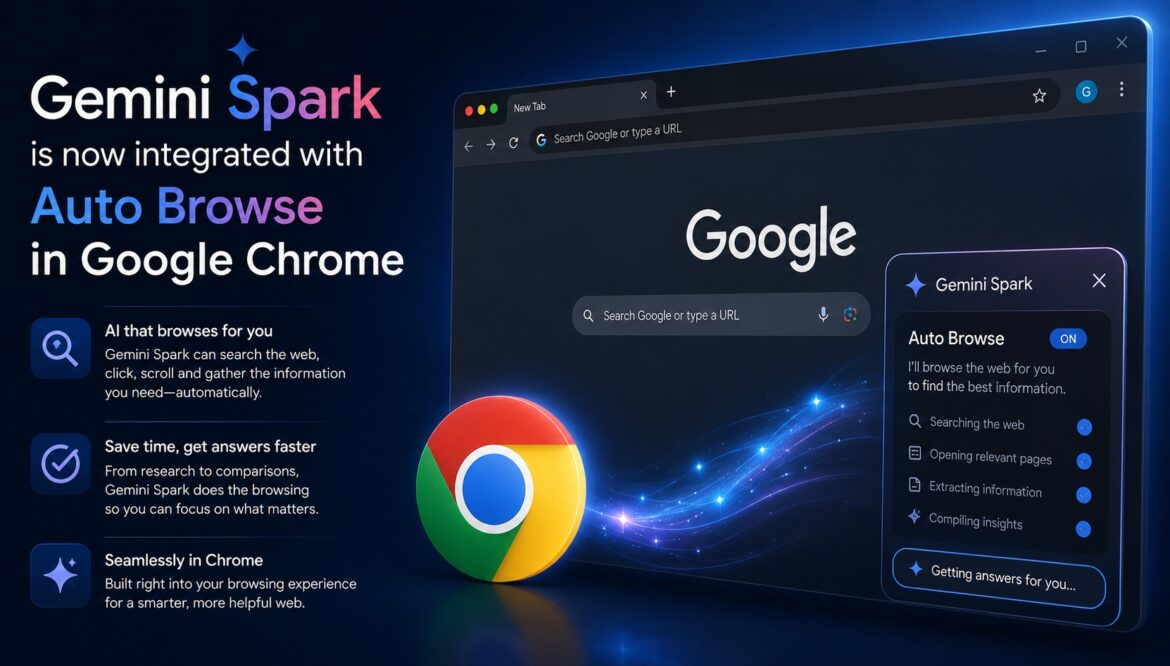
On July 30, Google rolled out a Chrome integration for Gemini Spark, its agentic assistant, that lets it browse the web using your own desktop Chrome, signed into your own accounts, with your own saved passwords. Ask it to schedule an apartment viewing, compare flight options, or start a booking, and it opens Chrome, navigates the site, fills the forms, and gets as far as it’s allowed to before handing control back to you for anything sensitive, like a payment.
Gemini Spark 🤝 @GoogleChrome
Gemini Spark is now integrated with auto browse in Google Chrome. With your permission, Spark can handle web tasks for you right in your Chrome browser, like scheduling apartment viewings or auto-filling flight info.
— Google Gemini (@GeminiApp) July 30, 2026
That is a different thing from Gemini in Chrome’s earlier sidebar, which mostly summarised the page you were already on. Auto browse means the agent goes to pages you haven’t visited, on a goal you described in one sentence, and operates them the way a person would. It’s rolling out first to Google AI Pro and AI Ultra subscribers in the US, alongside a broader expansion of general Spark access to more than 160 additional countries.
Enjoy Worthview?
Add Worthview as a Preferred Source on Google to see more of our stories in Search.
What actually changed, and where India stands
Spark itself launched at Google I/O in May 2026 as a background task-completion agent connected to Gmail, Calendar, Drive, and other Workspace apps. Gemini in Chrome’s own auto-browse capability arrived separately, earlier in the year. What’s new this week is the two being wired together: Spark can now reach into your local Chrome session to actually complete the web-based part of a task, not just describe how to do it.
| May 2026
Spark launched at Google I/O |
160+
Countries gaining broader Spark access |
US-only
Where Chrome auto-browse is live today |
2
Distinct jobs a page now has to do |
| 🇮🇳 India angle
The wider Spark rollout reaches India this week, but the Chrome auto-browse layer does not — Google has said it will bring that piece to more regions “over time,” and at least one reviewer confirmed it hadn’t appeared yet on an Indian account. That gap is a genuine head start: the sites that get their structured data and form accessibility in order now will already be agent-ready when auto-browse does land locally. |
Two jobs, one page
Search optimization has always had one underlying goal: get found, get clicked, by a human or by a crawler standing in for one. Agentic browsing splits that into two separate jobs, and they don’t respond to the same fixes.
Job one: getting cited
When Spark does research — summarising a topic, building a news digest, comparing options with sources — it’s reading your page and deciding whether to reference it. This is the same battle publishers have been fighting with AI Overviews, ChatGPT, and Perplexity: structure that favours direct-answer clarity, clear authorship and dates, and content specific enough to be worth quoting rather than paraphrasing generically.
Job two: getting used
When Spark auto-browses to complete an errand, it isn’t looking for a citation — it’s trying to operate your page: read a price, fill a field, click a button, finish a flow. A page can be excellent at job one and unusable for job two, or the reverse. Most sites, until now, have only ever had to think about job one. We’ve covered the emerging protocol built specifically for this problem in WebMCP for Beginners.
What actually breaks when an agent tries to use your site
- Interactive elements built entirely in custom JavaScript with no semantic HTML underneath — an agent can’t reliably find a field it can’t identify as a field.
- Form inputs without proper labels, so there’s no clean mapping between what the user asked for and which box to fill.
- Multi-step checkout or booking flows that reveal cost, availability, or terms late — fine for a patient human, confusing for an agent trying to verify it’s completing the task within the constraints it was given.
- Interstitials, cookie modals, and login walls that behave like anti-bot friction, even though a real signed-in user (via their agent) is the one trying to get through.
- No structured data describing price, availability, or the action a page supports — leaving an agent to guess from visual layout alone.
What to actually do about it
None of this requires rebuilding a site from scratch. It requires treating “agent-usable” as a second checklist alongside the one you already run for search and AI citation.
If you run content or a publication
- Keep optimising for the citation layer: direct-answer openings, clear bylines and dates, specific data and analysis rather than generic summary — this is unchanged GEO/AEO work, just with one more engine reading it.
- Cover your own beat’s agentic developments quickly and specifically — timely, well-sourced coverage of a topic is exactly what a research-mode agent is likely to pull from.
If you run tools, forms, or anything transactional
- Audit every input field for a real, associated label — not a placeholder, not a floating design element standing in for one.
- Prefer standard HTML form elements over fully custom-built widgets wherever the interaction doesn’t need to be custom.
- Add or verify structured data (Product, Offer, Service, WebApplication, HowTo, as applicable) so price, availability, and the supported action are machine-readable, not just visually implied.
- Reduce the number of steps between “intent” and “completion” — friction that used to just slow a human down can cause an agent to abandon or misinterpret the flow entirely.
For everyone
- Start watching server logs for new agent-associated user agents as this rollout widens — you want baseline traffic data before this becomes a reporting problem.
- Decide deliberately what you want Spark and similar agents to be able to do on your site, and reflect that in robots.txt and any llms.txt policy, rather than leaving it to default behaviour.
Who this quietly disrupts
Sites built entirely around visual polish, with no semantic or structured fallback, become harder for an agent to use — not broken, exactly, but skipped in favour of a competitor an agent can actually operate. Deal and coupon aggregators face a version of the same threat other agentic shopping features already pose: if an agent can check price and availability itself, the middle layer that existed purely to surface that information has less to offer.
On the other side, sites with clean structured data, plain accessible forms, and well-marked-up content become more visible in a layer that didn’t exist a year ago — not because they chased this trend, but because sound technical fundamentals happen to be exactly what both a search crawler and a browsing agent need.
Frequently Asked Questions
Is Gemini Spark’s Chrome auto-browse available in India?
Not yet. The broader Spark access is expanding to India and 160+ other countries this week, but the deeper Chrome auto-browse integration is currently US-only, with Google saying it will expand “over time.”
Does this replace the SEO and GEO work I’m already doing?
No. Citation-focused optimisation — the work behind ranking and being referenced by AI answer engines — is unchanged. Agent-usability is an additional layer on top of it, most relevant to pages with forms, bookings, or transactions.
Do I need to redesign my whole site for AI agents?
For most sites, no. The fixes are targeted: form labels, structured data, and simpler flows on the specific pages where a task would actually be completed, not a wholesale rebuild.
How is this different from optimising for AI Overviews or ChatGPT citations?
Citation optimisation is about being read and referenced. Auto-browse optimisation is about being operated — an agent filling in a form or completing a booking on the page itself. They overlap in places but aren’t the same discipline.
Will this show up in my analytics?
Not cleanly yet. Agent-driven sessions using a person’s own local Chrome browser can look identical to a normal signed-in visit in current analytics tools, which is exactly why it’s worth watching server-level logs rather than relying on GA4 alone.
The bottom line
Auto browse is a narrow, US-first, permission-gated feature today. But it’s the clearest sign yet that browsing itself is becoming something software does on a person’s behalf, not just something a person does directly. The sites that treat this as a second, quieter audience — one that reads structure instead of design, and acts instead of just deciding — will be the ones still getting found, cited, and used when this stops being a US-only feature and becomes the default way a browser works.
| The real shift isn’t that AI can now browse for you. It’s that a page’s audience quietly became two: the person deciding, and the agent executing. Most sites are still only built for the first one. |
Enjoy Worthview?
Add Worthview as a Preferred Source on Google to see more of our stories in Search.

Worthview Editorial Team is the shared byline for content created collaboratively by Worthview’s editors and contributors. Since 2008, we’ve published thousands of articles across technology, AI, finance, health, home, travel, and lifestyle. Our editorial process emphasizes original research, reputable sources, regular content updates, and clear attribution. Articles covering higher-trust topics, including health and finance, may also undergo review by qualified subject-matter experts.





One thought on “The Web Is Getting a Second User: What Gemini Spark’s Auto Browse Means for SEO”
Comments are closed.